VaultSort has a Vault
For two years this app has been called VaultSort and has not had a vault in it.
You noticed. Several of you told me.
VaultSort 5.3.0 is out today, and the first half of the name finally means
something.
What it is
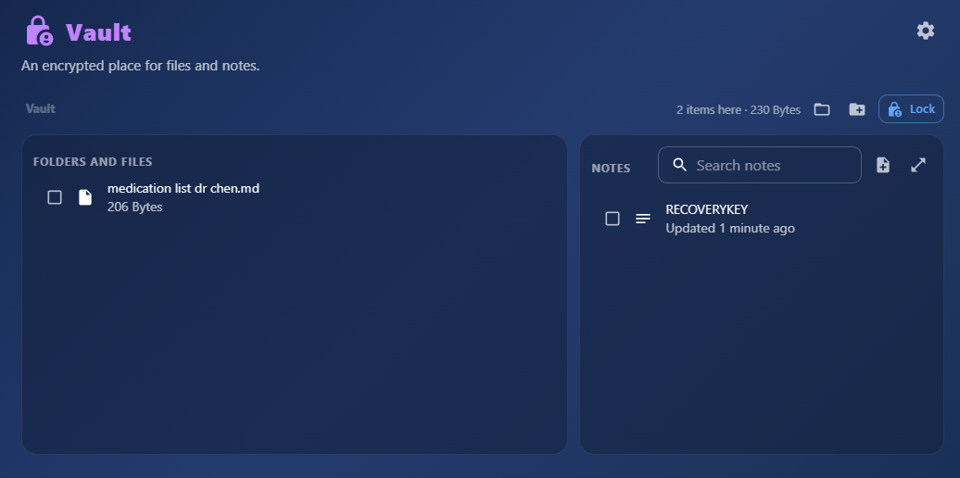
The Vault is an encrypted place on your own disk. Files, folders and notes go
in it together. It opens with a security key, your fingerprint, or a password,
and it locks itself again when you walk away.
Nothing is uploaded. There is no account to make. The Vault sits in a folder you
choose, on the machine in front of you, and that is the whole architecture.
Why a place, and not another button
Everything VaultSort did before this was something you did. Organize these
files. Erase that drive. Encrypt this document.
Operations work exactly as advertised and share one flaw: you have to remember
to run them. Six months after encrypting a handful of files, you cannot recall
which ones you protected, where you left them, or whether the tax return open in
front of you is the locked copy or the one you made to email your accountant.
The protection was real. The filing system was you.
A vault moves that decision up a level. Things inside it are protected because
of where they are. There is no moment where you meant to lock something and
did not, because putting it in is locking it.
How you open it
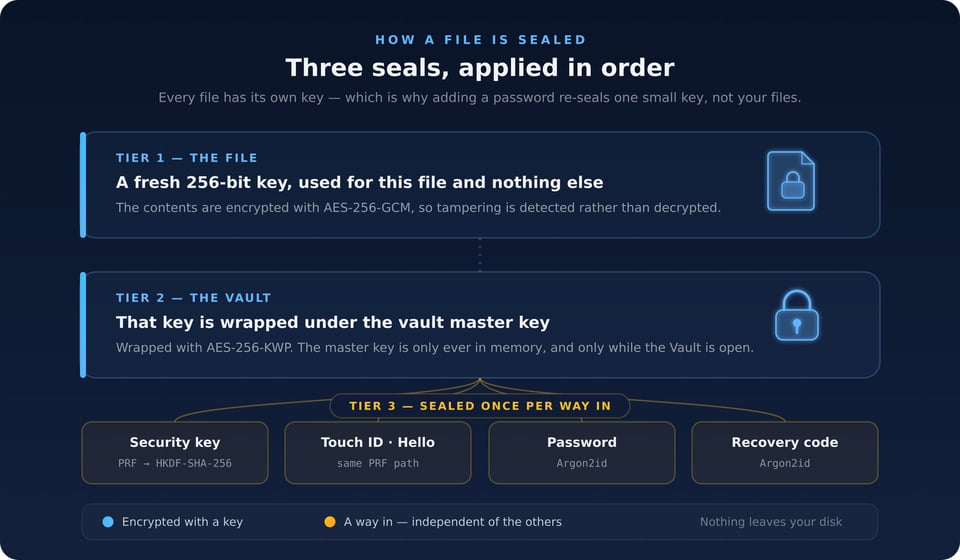
Four ways, and any single one of them works:
- A security key — a YubiKey or any FIDO2 key with WebAuthn PRF support.
- Touch ID, or Windows Hello on a PC.
- A password, stretched with Argon2id.
- A recovery code, generated once and written down by you.
They are peers, not a chain. Losing a key costs you nothing, because the other
three were never derived from it. VaultSort asks you to add a second method when
you create a Vault, and refuses to remove the last one.
Every file inside gets its own key, which is why adding a password to a Vault
you normally open with a YubiKey re-seals one small key rather than re-encrypting
a hundred gigabytes.
Premium Vault
The Vault is a premium feature. Creating one needs a licence, and so does putting
things into it.
Opening it does not. Neither does reading it, exporting from it, deleting from
it, or adding a new recovery code.
A licence is a thing a program can be wrong about. Yours never expires — it
is a one-time purchase — but the app's belief about it can still read false. You
might be offline. You might have just reinstalled. You might be setting up a new
laptop.
If any of that could stand between you and your own files, they were never really
yours. So:
> A paywall may block what goes in. It must never block what comes out.
If your licence ever fails to verify, your Vault degrades to read-only. It still
opens. Everything still comes out.
What it does not do yet
- It does not sync. Your licence covers six devices; each keeps its own
- There is no mobile app.
- It does not version files. The Vault is a safe, not a time machine.
Getting it
- 3.0 is available now for macOS on Apple silicon. If you already own
New here? VaultSort is $24.99, once, for six devices. No subscription.
→ https://vaultsort.com/vault
Windows is available, VaultSort is still in beta on Windows, and the Vault is in the beta build
with the same format and the same guarantees. If you are on Windows and want it,
join the beta channel at https://vaultsort.com/beta
Open the app, go to Protect, choose Vault. Pick how to open it, add a second
method, write the recovery code down somewhere that is not the machine.
Then start with the file you would least like to explain losing.
Ready to Secure Your Mac?
Experience the latest features and security improvements mentioned in this update. Join thousands of Mac users who trust VaultSort to organize and protect their files.