Hey there,
It has been about a month since the last VaultSort newsletter, so I wanted to send a quick check-in.
The short version: VaultSort has not been sitting still. I have been heads-down shipping steady improvements, tightening the product, and continuing to push VaultSort toward a file automation tool that is powerful without becoming opaque.
Today I am announcing one of the most useful additions to that workflow:
Revise With AI is now live in VaultSort Premium.
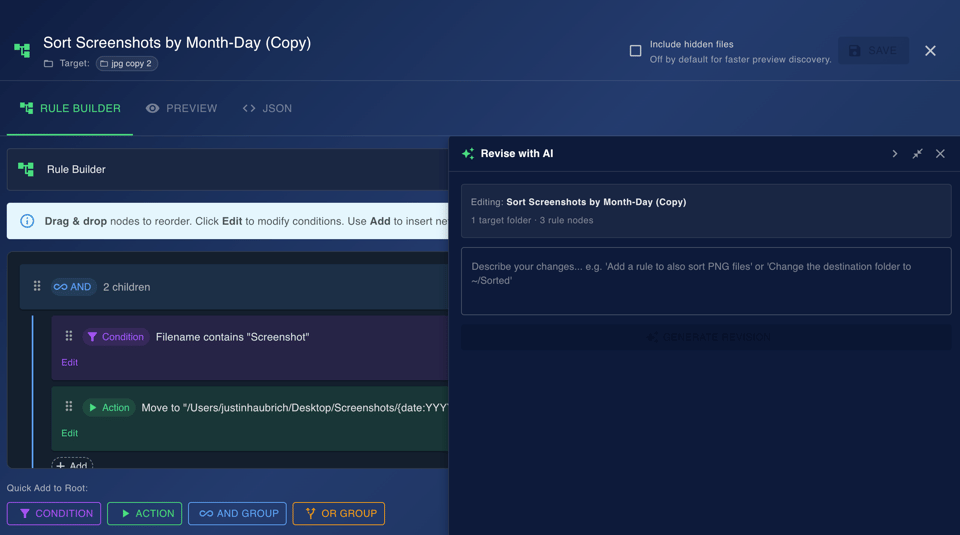
If you have already used AI Job Builder to create a rule from scratch, Revise With AI is the natural next step. Instead of rebuilding an existing job node by node, you can now open a job you already have, describe the change you want in plain English, and let VaultSort propose the update for review.
What Revise With AI Does
Revise With AI lets you modify an existing Advanced Organize job without starting over.
Examples:
- "Also sort PNG files into the same folder"
- "Change the destination folder to ~/Pictures/Sorted"
- "Remove the date-based subfolder structure"
- "Add a rule to ignore files smaller than 1 MB"
VaultSort sends the current job configuration and rule tree to your selected AI provider, generates a proposed revision, and then shows you exactly what changed before anything is saved.
That last part matters.
This is not a black box. Revise With AI is designed to be reviewable and non-destructive:
- You see a structural diff before committing changes
- Added rules are clearly marked
- Removed rules are clearly marked
- You can accept or discard the revision
- Nothing is saved until you explicitly click Save
{{ subscribe_form }}
Why I Built It
Creating a complex rule from scratch is one problem. Editing that rule two days later is another.
That is the friction Revise With AI is meant to remove.
A lot of file automation tools are easy only when your needs are simple. VaultSort takes a different approach: keep the underlying rule builder powerful, but remove the repetitive work around it.
AI Job Builder helps with the blank page.
Revise With AI helps with iteration.
Together, they make Advanced Organization much faster to use in the real world.
How to Use Revise With AI
- Update VaultSort to the latest version.
- Open an existing Advanced Organize job.
- In the Rule Builder, open Revise With AI.
- Describe the change you want in plain English.
- Click Generate Revision.
- Review the structural diff.
- Accept the revision if it looks right, or discard it if it does not.
- Dry-run the job, then save when you are satisfied.
That is the intended workflow: AI proposes, you review, VaultSort stays under your control.
Providers, Privacy, and Cost
Revise With AI uses the same privacy model as AI Job Builder:
- Bring your own API key
- Supports OpenAI, Anthropic, and Google Gemini
- API keys are stored locally on your Mac
- Requests go directly from VaultSort to your selected provider
- VaultSort does not proxy or store your key
If you are using Google Gemini, you can often use these features for free with Google AI Studio's free API tier. OpenAI and Anthropic typically cost well under a cent per request for this kind of workflow.
A Quick Product Check-In
Even when I am quiet on email, I am still actively improving VaultSort.
The goal is not to ship random features. The goal is to keep making VaultSort more useful, more capable, and more polished with consistent updates that compound over time.
That means continuing to improve:
- File automation
- storage cleanup workflows
- security and privacy tooling
- and the overall day-to-day experience of using the app
Revise With AI is part of that broader push.
Try It
If you already have VaultSort Premium, update to the latest version and try Revise With AI on one of your existing jobs.
If you have not tried the AI features yet, this is a good place to start:
- Use AI Job Builder to create a job from scratch
- Use Revise With AI to refine it in plain English
- Dry-run everything before execution
As always, if you reply to this email with feedback, ideas, or edge cases you want VaultSort to handle better, I will read it.
Thanks for following along.
— Justin
P.S. If you tried AI Job Builder when it first launched, Revise With AI is the missing half of that workflow. It makes existing jobs much easier to maintain.
Ready to Secure Your Mac?
Experience the latest features and security improvements mentioned in this update. Join thousands of Mac users who trust VaultSort to organize and protect their files.