
Create it. Revise it. Done.
Create advanced file organization rules from a sentence, then modify existing jobs with plain English too. VaultSort shows you the proposed changes before anything runs or gets saved.
Premium features · Supports OpenAI, Anthropic, and Google Gemini with encrypted local BYOK
Manual rule building is painful
VaultSort's Visual Rule Builder is powerful — full AND/OR/NOT boolean logic, predicates for file type, size, date, name patterns, and more. But building complex rules node by node takes time. For a rule set that sorts your Downloads folder into six categories with date-based subfolders, you're looking at 10–20 minutes of manual configuration.
And once a job exists, changing it can be just as annoying. For power users, that's friction. For new users, it's a wall. We built AI Job Builder and Revise With AI to remove both.
Start from zero. Ten seconds.
Describe
Type what you want in plain English. No special syntax. No technical knowledge required.
"Organize my Desktop — move videos to Movies, documents to Work, and archive everything older than 6 months."
Generate
AI analyzes your request and builds the complete rule tree — predicates, boolean logic, folder structure, and all.
Powered by GPT-4o Mini, Claude 3.5 Haiku, or Gemini. Typical generation: 5–15 seconds.
Review & Run
Generated rules load into the Visual Rule Builder. Edit anything. Dry-run to preview. Then execute when you're ready.
Nothing moves without your approval. You are always in control.
Change existing jobs without starting over
Open any Advanced Organize job, tell VaultSort what to change, and the AI updates the current rule tree with full job context. You review a structural diff, accept or discard, then keep editing or dry-running before you save.
Context-aware edits
VaultSort sends the current job configuration, rule tree, and target setup so the AI knows exactly what already exists before it changes anything.
Structural diff view
Added rules show in green with a + marker. Removed rules show in red with a − marker and strikethrough, plus a summary chip for additions and removals.
Accept or discard
Load the revision into the Visual Rule Builder for manual tweaking or throw it away completely. Nothing is saved until you explicitly click Save.
Resizable side panel
Expand it for more room, collapse back to default, or minimize it to a slim strip so the builder stays visible while you think.
Example revision requests
"Also sort .png and .webp files into the same folder"
"Change the move destination from ~/Downloads/Sorted to ~/Pictures/Organized"
"Remove the date-based subfolder naming and keep everything flat"
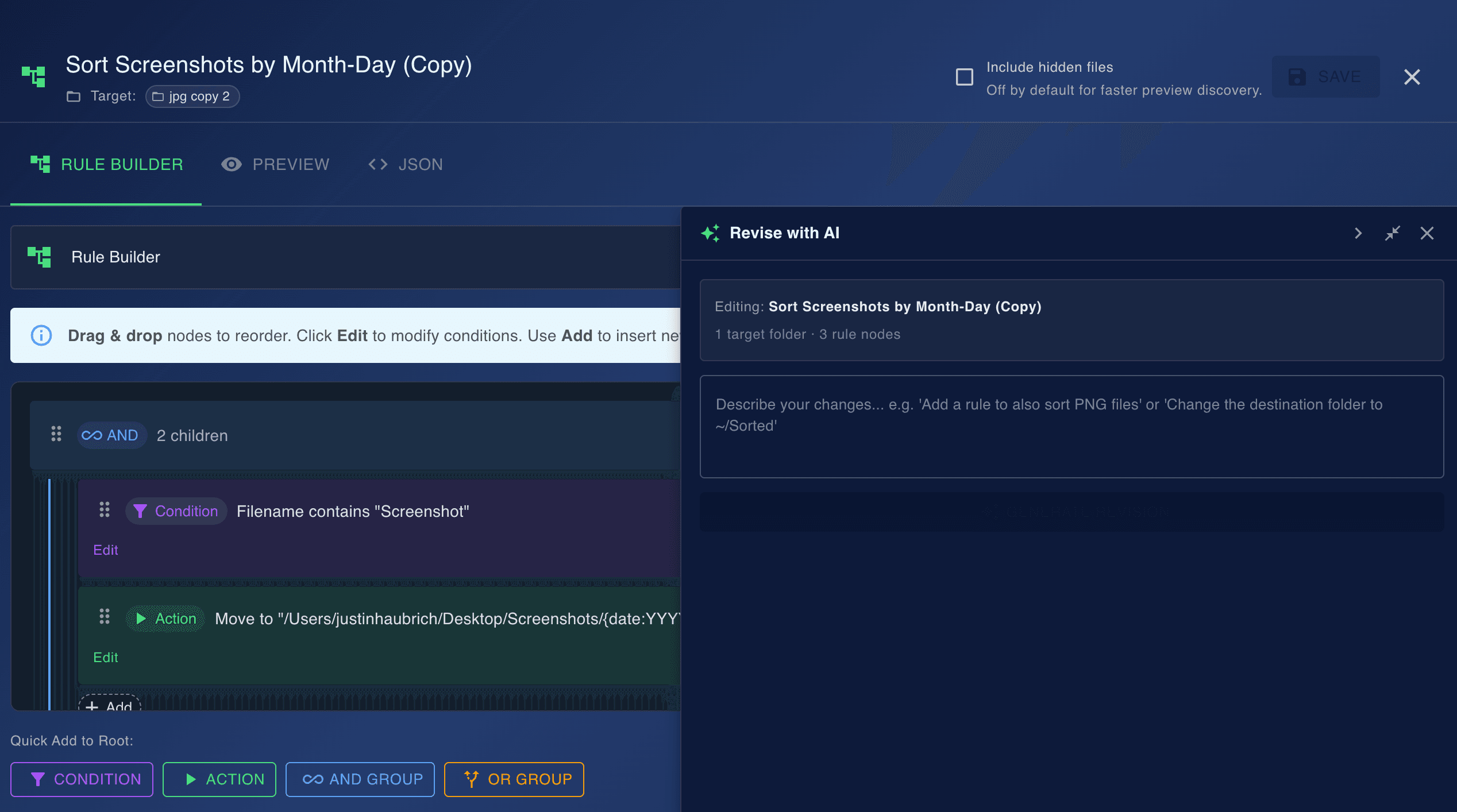
Revise With AI lives in the Visual Rule Builder toolbar as a slide-out panel. It complements Create With AI: first generate a job from English, then iteratively refine it from English without rebuilding the whole thing.
Real examples. Real results.
Type a sentence. Get a complete rule set, or revise an existing one.
"Move screenshots from Desktop to a Screenshots folder, organized by month"
Creates date-based subfolders and routes .png/.jpg files with "Screenshot" in the name.
"Organize Downloads — PDFs to Documents, ZIPs to Archives, images to Pictures"
Builds a multi-branch rule tree that routes files by extension into three destination folders.
"Move files older than 90 days from Desktop to an Archive folder"
Generates a date predicate rule that identifies stale files and moves them to Archive.
"Tag all video files on my external drive with a blue Finder tag"
Creates an extension-based filter for video formats and applies Finder tag metadata.
"Sort project files by client name using folder prefixes"
Parses folder naming patterns and creates rules to distribute files into client-specific directories.
Why it's better
10 Seconds vs. 10 Minutes
What used to take manual node-by-node rule building or tedious rule edits now takes one sentence. AI handles the complexity — you handle the review.
No Learning Curve
You don't need to understand predicates, operators, or AST trees. Write in your own words. The AI speaks VaultSort fluently.
Iterate Without Starting Over
Revise With AI keeps your existing folders, rules, and job settings in place. Ask for a change instead of rebuilding the whole workflow from scratch.
Full Transparency
Every generated or revised rule loads into the Visual Rule Builder. See exactly what the AI created, inspect the structural diff, then edit, delete, or refine any part before execution.
Dry-Run First, Always
AI output goes through dry-run preview before any files are touched. You see what will happen. Then you decide.
Minimally Invasive Changes
Revise With AI is instructed to change only what you asked for, not to reorganize or “improve” untouched parts of your rule tree.
Your Key, Your Privacy
API keys are stored locally on your Mac and encrypted. VaultSort never sees, stores, or proxies your key. Data goes directly from your Mac to your selected provider.
Free with Gemini
Google offers free Gemini API keys — no credit card required. Use AI Job Builder at zero API cost, or choose OpenAI or Anthropic at under $0.01 per generation.
Built for everyone
Whether you're a first-time user or a VaultSort veteran.
Power Users
Skip the boilerplate. AI handles the tedious rule setup and iterative edits so you can focus on fine-tuning in the Visual Rule Builder.
New Users
No need to learn predicates or boolean logic. Describe what you want and let AI translate it into rules.
Developers
Already have an OpenAI, Anthropic, or Gemini API key? Put it to work for both new job creation and revisions. Each generation costs a fraction of a cent — or nothing with Gemini's free tier.
Content Creators
Organize entire media libraries with a single sentence. Sort photos by date, camera, project — whatever you need.
Students & Researchers
Tame chaotic Downloads folders. Route PDFs to Research, spreadsheets to Data, everything else to Archive.
Privacy-first by design
What gets sent
- Your text prompt describing the desired organization
- For revisions, the current job configuration and rule tree structure
- VaultSort's rule schema (so AI knows the format)
What never leaves your Mac
- Your API key — stored locally, never transmitted to VaultSort
- Your file names, paths, or contents
- Your system or personal information
VaultSort uses a BYOK (Bring Your Own Key) model. We have zero API infrastructure and zero access to your provider account. Requests go directly from VaultSort on your Mac to OpenAI, Anthropic, or Google. We are never in the middle.
What does it cost?
with Google Gemini
Or typically < $0.01 per create or revise request with OpenAI / Anthropic
$0
Gemini free tier — no credit card needed
$5
in OpenAI/Anthropic credits covers 1,000+ generations
$0
cost to VaultSort — no markup, no proxy
Get a free API key from Google AI Studio and start using AI Job Builder and Revise With AI at zero cost. Or use OpenAI / Anthropic at their standard rates — VaultSort never adds fees.
Stop rebuilding rules manually.
One sentence to create. One sentence to revise. Full control the whole way through. AI Job Builder and Revise With AI are available now in VaultSort Premium.
Lifetime license · No subscription · Free updates · 30-day money-back guarantee