title: "GDPR Compliance for Legal Professionals: A Practical Guide to Safer Client File Workflows" date: "2026-03-25" excerpt: "Learn how legal professionals can reduce GDPR risk, control document sprawl, and build safer client-data workflows on Mac with VaultSort." coverImage: "/images/blog/gdpr-legal.jpg" categories: ["Legal", "GDPR Compliance", "Law Practice Management", "Data Security"]
GDPR Compliance for Legal Professionals: A Practical Guide to Safer Client File Workflows
For legal professionals, data protection is not a side issue. It is part of the client experience, part of operational discipline, and increasingly part of business development.
Clients want to know their contracts, dispute files, due diligence folders, HR records, board materials, and identity documents are being handled with care. Regulators expect appropriate safeguards. And lawyers themselves need systems that do not add friction to already demanding work.
That is why VaultSort is such a strong fit for legal professionals. It helps law firms and in-house legal teams create cleaner, safer, more repeatable file workflows on Mac. It does not make a firm GDPR compliant on its own, but it can play an important role in a broader compliance program by helping teams organize sensitive files, reduce unnecessary copies, encrypt local data, and securely dispose of information when appropriate.
Why GDPR Feels So Difficult in Legal Work
Legal work creates document sprawl almost by default.
A single matter can generate:
- Engagement letters
- Client IDs and onboarding documents
- Contracts and redlines
- Internal legal advice
- Email exports and attachments
- Discovery or disclosure bundles
- Billing records
- Signed PDFs saved in multiple places
Now multiply that across dozens or hundreds of matters, multiple lawyers, shared drives, laptops, external media, and cloud sync tools.
The problem is not just volume. It is control.
The GDPR makes that control issue very clear. Under Article 5, personal data should be limited to what is necessary, kept no longer than necessary, and processed with appropriate security and confidentiality. Article 32 adds that controllers and processors should implement security measures appropriate to the risk, including encryption where appropriate.
For legal professionals, that means GDPR is not only about privacy notices and policies. It is also about the daily mechanics of where files live, how many copies exist, who can access them, and how they are cleaned up over time.
The Real GDPR Risk in Law Firms Is Often Everyday File Handling
When legal teams think about GDPR, they often think about contracts, lawful bases, or international transfers. Those matter. But many real-world problems show up much lower in the stack:
- A
Downloadsfolder full of client attachments - Duplicate copies of contracts spread across desktop folders and shared drives
- Old due diligence files still sitting on external media after a transaction closes
- Sensitive draft agreements saved locally without encryption
- Matter folders with inconsistent naming and no predictable structure
- Archived files kept forever because no one is confident enough to sort and review them
This is where GDPR principles like data minimisation, storage limitation, integrity and confidentiality, and accountability become operational, not theoretical.
Common Problems Legal Professionals Face That VaultSort Helps Solve
1. Too Many Copies of the Same Sensitive File
Legal work naturally creates versions. There is the client copy, the partner markup, the final execution version, the board pack PDF, the downloaded attachment, and the copy someone saved to the desktop before a call.
This creates two problems:
- It is harder to know which file is current
- It is harder to know which copies still need protection or deletion
VaultSort's deduplication and organization capabilities help reduce unnecessary copies and make document sprawl easier to govern. That supports GDPR's data minimisation principle in a practical way: less duplicate data means less surface area to secure.
2. Matter Files Get Mixed With General Business Files
Many firms and solo practitioners still rely on messy folder systems that blend client materials with templates, marketing files, invoices, HR records, and personal downloads.
VaultSort helps legal professionals build matter-centric structures so:
- Client files are easier to separate
- Sensitive legal documents are easier to find
- Non-matter clutter is less likely to mix with client information
- Teams can follow more consistent naming and folder conventions
This is not just tidier. It reduces the risk of accidental disclosure and makes reviews, audits, and cleanups far less painful.
3. Local Mac Storage Becomes a Blind Spot
Even when a firm uses a document management system, important files still end up on local devices: downloaded exhibits, PDF bundles, scanned IDs, signature packets, and temporary exports.
VaultSort is useful here because it addresses the messy local layer that often gets ignored. Legal professionals can use it to:
- Organize local client files into predictable structures
- Encrypt especially sensitive files stored on a Mac
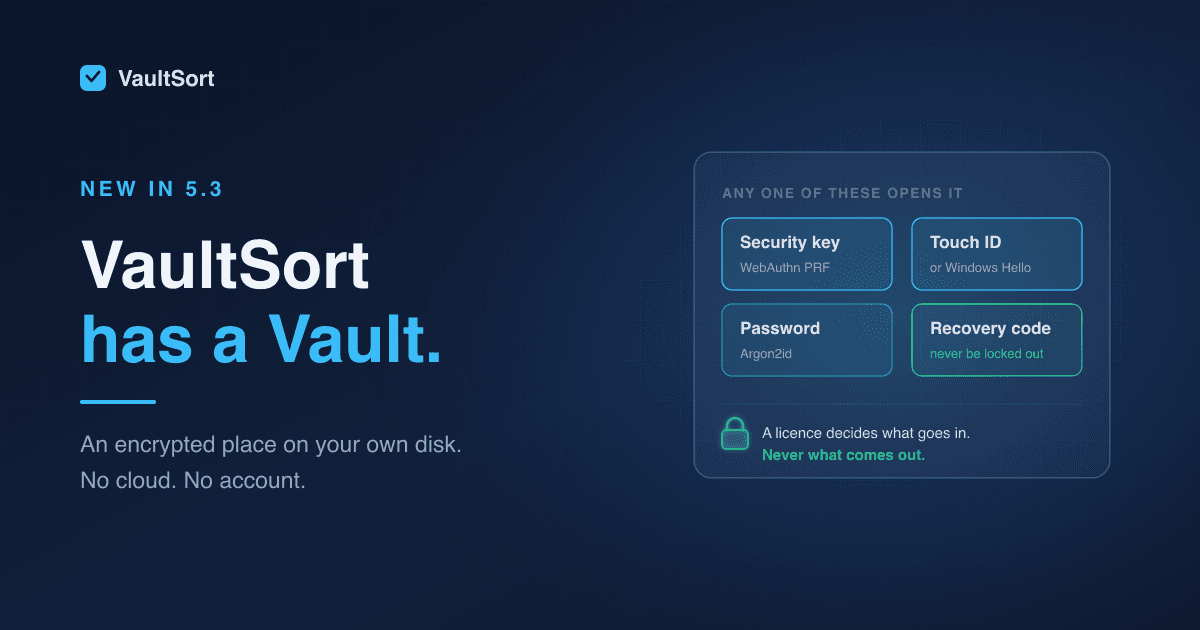
- Use hardware-key protection with YubiKey integration for stronger workflows
- Review storage conditions with system analysis and FileVault awareness
That makes local storage feel less like a shadow system and more like a managed part of the practice.
4. Retention and Disposal Are Handled Inconsistently
GDPR's storage limitation principle pushes firms to think carefully about how long they keep personal data. But legal practices also need to balance this with litigation holds, professional obligations, statutory retention periods, and client-specific requirements.
In real life, that often means firms know they should review and dispose of some files, but the cleanup never happens because it feels risky and manual.
VaultSort helps by making review and disposal workflows more intentional:
- Secure deletion for files that should no longer remain on a device
- Free-space wiping for legacy media and external drives where deleted traces matter
- Batch operations for cleaning up closed-matter working files
- Clearer organization so retention reviews are easier to complete
The result is not "delete everything." It is a more defensible, deliberate way to manage what should stay, what should be archived, and what should be removed.
5. Security Depends Too Much on Human Memory
One of the hardest parts of compliance is making the right behavior repeatable.
If security depends on every lawyer and staff member remembering the perfect folder name, manually encrypting the right files, and cleaning up every temporary copy after a deadline, mistakes are inevitable.
VaultSort helps reduce this operational drag with:
- Advanced organization rules
- Scheduled jobs
- Operation logs
- Batch processing
- Finder-integrated workflows
That means better habits can become part of the system instead of depending entirely on willpower.
Why VaultSort Is a Great Fit for GDPR-Sensitive Legal Work
VaultSort stands out for legal professionals because it works at the intersection of three things law firms struggle with most:
1. Order
Legal professionals need fast access to the right file, in the right matter, at the right moment.
VaultSort helps create cleaner, matter-based structures that are easier to search, easier to review, and easier to maintain across active and closed files.
2. Protection
GDPR Article 32 explicitly points to appropriate technical and organisational measures, including encryption where appropriate.
VaultSort supports that practical side of protection with encryption, hardware-key support, FileVault awareness, and device-sensitive security features for local data handling on Mac.
3. Restraint
A lot of compliance risk comes from keeping too much, too long, in too many places.
VaultSort helps legal teams act with more restraint by identifying duplicates, cleaning up temporary files, and supporting secure deletion when information should no longer remain on a device.
That is a valuable complement to data-mapping, policy, and vendor-management work happening elsewhere in the firm.
A Better Experience for Legal Teams
The value of VaultSort is not just that it is "secure." The value is the experience it creates.
A better legal workflow feels like this:
- Matter folders are structured and predictable
- Temporary files do not pile up for months
- Sensitive local files are encrypted when they should be
- Duplicate versions are easier to identify and remove
- Cleanup and retention reviews feel manageable instead of intimidating
That experience matters because legal work is already cognitively heavy. The last thing a lawyer needs is more uncertainty about whether a desktop folder, external drive, or sync directory is quietly creating compliance risk.
VaultSort helps replace that uncertainty with calm, visible control.
A Practical Workflow for Legal Professionals Using VaultSort
If you want to use VaultSort in a GDPR-aware legal environment, start with the operational basics.
Step 1: Identify Where Client Personal Data Actually Lives
Look beyond your DMS or practice-management platform. Check:
Downloads- Desktop working folders
- Shared deal rooms exported locally
- External drives
- Temporary transaction or litigation folders
- Old archive copies on staff machines
This gives you a realistic picture of your true data footprint.
Step 2: Separate Matter Files From Everything Else
Use VaultSort's organization features to create clearer structures by client, matter, document type, or stage. The goal is not perfection. The goal is making personal data easier to locate, secure, and review.
Step 3: Encrypt Sensitive Local Files
Where sensitive files need to exist locally, add encryption. This is particularly useful for:
- Draft legal advice
- Transaction bundles
- Client identification documents
- Employment investigation files
- Board and regulatory materials
Step 4: Reduce Duplicate Exposure
Run duplicate reviews on working folders, closed matters, and exported bundles. Every unnecessary extra copy is one more place that personal data can be forgotten, overshared, or retained too long.
Step 5: Make Retention Reviews Easier
Use cleaner folder structures, scheduled jobs, and secure deletion workflows to make periodic review more realistic. Firms are much more likely to follow policy when cleanup is straightforward.
What Legal Professionals Still Need Beyond VaultSort
It is important to be precise here: no file utility by itself "solves GDPR."
Legal professionals still need:
- A lawful basis for processing
- Clear retention policies
- Vendor due diligence and data processing agreements where needed
- Access controls and training
- Incident response procedures
- Cross-border transfer analysis where relevant
- Advice tailored to their jurisdiction and practice area
VaultSort is best seen as a strong technical and operational layer inside that broader framework, especially for local file organization, encryption, duplicate reduction, and secure disposal on macOS.
Final Thoughts
For legal professionals, GDPR compliance is not just a legal theory exercise. It shows up in the ordinary mechanics of files, folders, drafts, devices, and cleanup.
VaultSort is a great fit because it helps firms and legal teams create an environment that feels more controlled, more professional, and easier to defend. It reduces clutter, supports stronger local security, and helps turn compliance principles into daily habits.
If your team wants a calmer, cleaner way to manage GDPR-sensitive legal files on Mac, VaultSort is a smart place to start.
For related reading, see Attorney-Client Privilege Protected: How Legal Professionals Safeguard Confidential Information with VaultSort, Why Every Consultant and Freelancer Needs VaultSort to Protect Client Data, and Understanding FileVault Integration.
Disclaimer: VaultSort can support GDPR-sensitive file handling, but it does not by itself make a law firm or legal department GDPR compliant. GDPR compliance also requires legal analysis, policy, training, vendor management, and technical and organisational measures appropriate to the specific processing involved.